
Better Welfare
Onboard.
Less Risk
Ashore.
SeaDance gives commercial fleets a practical, managed way to improve crew welfare and meet MLC and ESG obligations through two purpose-built onboard solutions providing infotainment and entertainment to seafarers.
See it in ActionLife at Sea Has a Welfare Problem
Seafarers spend months away from home on vessels where shared social spaces go unused, and safety information gets missed. Shipowners and managers carry the compliance and human-factor risk.

Digital Isolation Is Rising
Crew spend more time alone on personal devices. Shared social time in recreation spaces has dropped significantly, increasing fatigue, poor sleep, and mental health risk onboard.

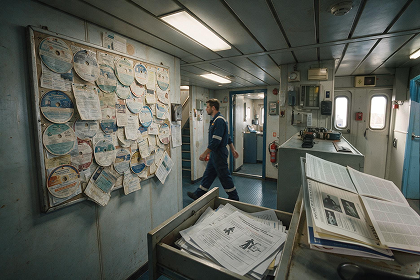
Safety Information Gets Lost
Printed circulars and shared folders are not reaching crew consistently. Safety awareness should not depend on whether someone checked a noticeboard before a watch.

Compliance Pressure Is Real
Charterers, P&I clubs, and flag states are asking harder questions about crew welfare. MLC and ESG reporting requirements mean a noticeboard and a photocopied circular are no longer enough.

Mixed Crew Communication
A vessel with Filipino, Indian, and Eastern European crew has different language and content needs. A single English noticeboard serves nobody particularly well.
What is SeaDance?
SeaDance Inform and SeaDance Entertain work independently or together, depending on what your fleet needs right now.

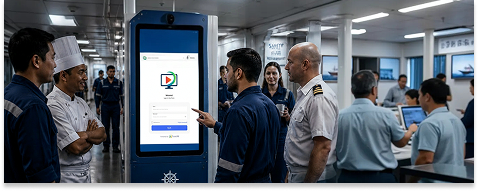
Keep Crew Informed, Trained, and Ready
A maritime-grade onboard kiosk installed in high-traffic crew areas. Shore teams manage everything remotely. Crew access safety updates, training, and notices. No personal device or login required.
- Safety alerts and operational updates pushed from shore
- Training and micro-learning modules onboard
- Inspection readiness and compliance support
- Health and well-being content
- Surveys, acknowledgements, and digital workflows
- 40+ languages supported

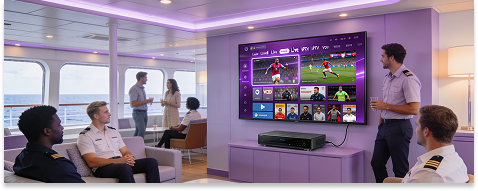
Live TV Entertainment Onboard
Licensed live IPTV and VOD through a set-top box connected to existing recreation room TVs. Shared viewing, no personal hotspots, no bandwidth surprises, and a rec room that crew actually wants to be in.
- 72 standard live channels — news, sports, lifestyle
- Offline VOD library as connectivity fallback
- Nationality-specific content for mixed crews
- Zero CAPEX — hardware included in subscription
- Fully managed — activation, updates, support
- MLC and ESG-aligned crew welfare tool
Built for Everyone Onboard and Ashore
Three distinct groups. Different priorities. One platform designed to work for all of them.
Ship Owners
Protect fleet value through measurable welfare improvements. Strengthen your ESG Social pillar with audit-ready engagement data — not good intentions on paper.
Ship Managers
Replace unreliable manual processes with a platform your shore team controls remotely. Reduce overhead on safety communication and crew training across the entire fleet.

Seafarers
Access training, safety updates, and entertainment through shared screens in the spaces you already use. No personal data needed. No personal device required.

Built for Everyone Onboard and Ashore
Three distinct groups. Different priorities. One platform designed to work for all of them.
Ship Managers
Replace unreliable manual processes with a platform your shore team controls remotely. Reduce overhead on safety communication and crew training across the entire fleet.
Seafarers
Access training, safety updates, and entertainment through shared screens in the spaces you already use. No personal data needed. No personal device required.
Ship Owners
Protect fleet value through measurable welfare improvements. Strengthen your ESG Social pillar with audit-ready engagement data — not good intentions on paper.
500+
Training modules across safety, compliance and wellbeing
40+
Languages supported for mixed-nationality crews
12
Standard live channels news, sports and lifestyle
30 GB
Monthly allowance supports 3+ hours of daily shared viewing
Frequently Asked Questions
Questions that come up before every fleet conversation.
Provide seafarers with access to wellness resources, mental health support, onboard recreation, digital learning, and regular communication with family. Encouraging social engagement and continuous learning helps improve overall wellbeing.
Crew morale improves through recognition programs, engaging entertainment, accessible training, social activities, and clear communication between ship and shore.
Use an onboard content management platform to distribute safety notices, videos, alerts, and important updates directly to crew devices, even with limited internet connectivity.
Automating welfare content distribution, reporting, and compliance tracking reduces manual administration while helping meet MLC crew welfare requirements efficiently.
Yes. Training content can be hosted on an onboard server, allowing crew to access courses through shared devices or the vessel's local network without requiring internet access.
Entertainment platforms can include movies, TV shows, music, eBooks, magazines, games, podcasts, fitness content, and educational resources to improve life onboard.
Digital welfare platforms provide measurable engagement, training completion, participation, and wellbeing metrics that can be used as supporting evidence for ESG reporting.

Entertainment and Learning
Delivered at Sea.
Fleet operators are using SeaDance to improve crew welfare, meet MLC and ESG obligations, and reduce compliance exposure — without adding IT overhead or operational complexity.